vrg Meets Bubble Tea: I Built a VergeOS TUI

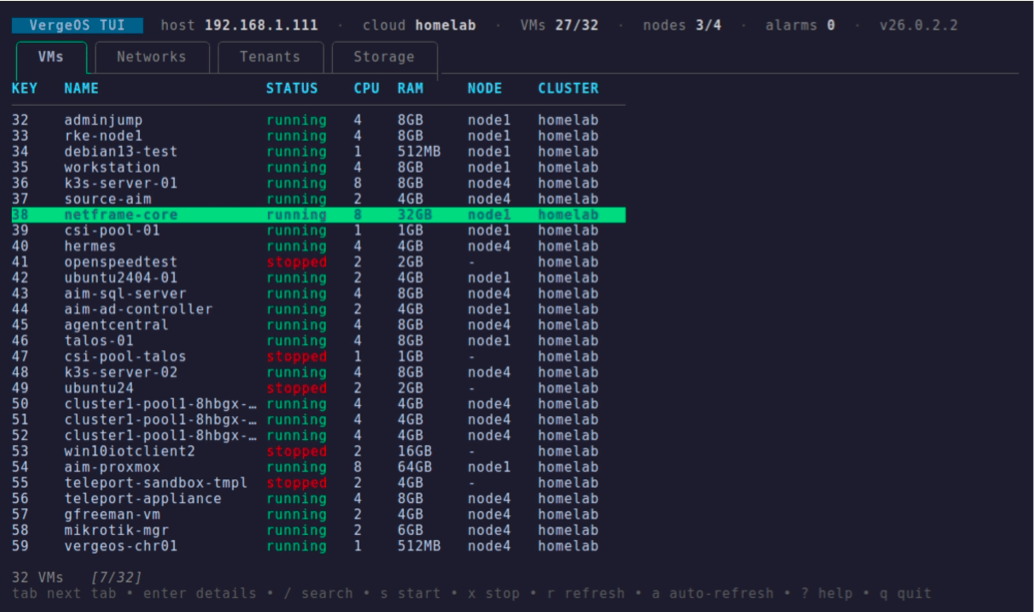
I have a confession: I love a good TUI.
Not the GUI, not the raw CLI: the TUI. The full-screen, keyboard-driven terminal app. k9s for Kubernetes, lazygit for git, htop for processes. The ones that make you feel like you're flying the plane instead of filling out a form. You live in the terminal anyway; a good TUI meets you there and hands you a cockpit.
VergeOS gives you three ways to drive it: a slick web GUI, a REST API, and (newly public) the vrg CLI. All good. But none of them is the thing I actually wanted while SSH'd into a jump box at 11pm: a fast, keyboard-first dashboard where I can tab between VMs and networks, hit enter to drill in, and / to find the one VM I care about.
So I built it. It's called vergeos-tui, it's built on Bubble Tea, and it drives vrg in the background for every operation.
The interesting part isn't that I built a TUI. It's how little work it turned out to be, and the reason for that is a lesson about what makes a good CLI in the first place.
Why a TUI, in 2026
The case for a TUI is the case for the terminal itself. It's already where I am. It works over SSH with no port-forwarding or VPN gymnastics. It starts instantly, uses no GPU, and never makes me reach for the mouse. And a browsable TUI (tabs, a cursor, live filtering) turns "remember the exact subcommand" into "look at the thing and press a key."
For infrastructure specifically, the sweet spot is the middle ground between the GUI and the CLI. The GUI is great for deep, occasional configuration. The raw CLI is great for scripting. But for the daily "what's running, is it healthy, let me poke this one thing" loop, a TUI beats both. That loop is exactly what k9s nailed for Kubernetes, and it's exactly what I wanted for VergeOS.
The insight: a good CLI is a TUI waiting to happen
Here's the thing that made this a weekend project instead of a month-long slog.
Bubble Tea follows the Elm architecture: your app is a Model (state), an Update function (react to messages), and a View (render the state). Every side effect, including "go run a command," is a tea.Cmd that executes off the UI thread and comes back as a message. The UI never blocks.
That means the entire backend of my TUI is just… calling vrg and parsing what it says. And vrg makes that trivial, because it was built to be machine-readable:
// The whole backend, essentially: run vrg with structured output, parse JSON.
func runJSON(args ...string) ([]byte, error) {
    // -q -o json are GLOBAL flags, so they come before the subcommand
    cmd := exec.Command("vrg", append([]string{"-q", "-o", "json"}, args...)...)
    return cmd.Output()
}

func ListVMs() ([]VM, error) {
    out, err := runJSON("vm", "list")   // → vrg -q -o json vm list
    // ... json.Unmarshal into []VM
}
Then each of those becomes a one-line Bubble Tea command:
// A tea.Cmd runs in the background and returns a Msg the UI reacts to.
func loadVMs() tea.Msg {
    vms, err := vrg.ListVMs()
    if err != nil {
        return errMsg{err}
    }
    return vmsMsg{vms}
}
That's the whole pattern. Press r, fire loadVMs, get a vmsMsg back, drop the rows into a table. Switch tabs, fire loadNetworks. Open a VM, fire a command that runs vrg vm drive list and vrg vm nic list and bundles the result.
And here's the part I want to underline: the same properties that make vrg good for an AI agent make it good for a TUI. Clean -o json output. Stable, meaningful exit codes. Global flags that behave predictably. I wrote a whole post a while back about vrg being "agent-native." Turns out "agent-native" and "UI-native" are the same thing wearing different hats. A CLI that a language model can reason over is a CLI you can hang an interface on. Structured output isn't a nicety; it's the seam everything else bolts onto.
If vrg had only emitted pretty tables for humans, I'd have been writing brittle screen-scrapers. Instead I was writing json.Unmarshal.
The polish is the product
The gap between "it works" and "I want to use it" is entirely polish, and it's where I spent the second half of the weekend, and then kept coming back to it, one small increment at a time:
- Colored status everywhere: green/red/yellow at a glance.
- Lip Gloss usage bars on the storage tab: a filling pool renders as
██░░░░ 16%right in the list, colored by threshold, with a big 40-cell bar in the tier detail so an about-to-throttle pool is impossible to miss. - Drill-in detail for every resource:
enteron a VM shows its drives and NICs; on a network, its CIDR, gateway, and DHCP/DNS range; on a tenant, its state, UI IP, and UUID; on a storage tier, that big bar plus dedupe and IOPS. Long panels scroll in a viewport instead of overflowing. - Mouse, for when you want it: click a tab to switch, click a row to select (click again to drill in), spin the wheel to scroll. Keyboard-first, mouse-optional.
- A cluster-context header: one
vrg system infocall, rendered across the top: host, cloud name, VMs online/total, nodes, alarms, version. You always know which cloud you're driving and whether it's healthy. - Live search (
/): type to filter, with the matching substring highlighted. - Sort: press a column number to sort, again to reverse, again to clear, with a little
▲/▼in the header. - Auto-refresh with a live countdown: a
5spoll you can toggle, ticking down a livenext in 3s…counter so you know exactly when the next refresh lands, plus a[row/total]position indicator, a proper terminal title, and^Zsuspend. Table stakes for a tool you leave running.
Individually, small. Together, the difference between a script with a cursor and something that feels like a real tool. That's the whole game with TUIs: the data was never the hard part; the feel is.
The bigger point
I didn't set out to make a statement. I just wanted a cockpit. But building it crystallized something I keep circling back to on this blog.
VergeOS didn't ship the TUI I wanted. It shipped something better: the ingredients to build it myself. A CLI with clean, structured output and honest exit codes is a platform you can extend in whatever direction you need (an agent, a reconciler, a dashboard, a TUI) without asking anyone's permission or waiting for a roadmap. The web GUI is theirs. This interface is mine, and it exists because the CLI was complete enough to let me build it in a weekend.
That's the quiet superpower of a well-made CLI. It's not just a way to type commands. It's an API with a keyboard on the front, and once it's that, everything downstream (automation, agents, and yes, TUIs) is just a matter of what you feel like building.
I felt like building a TUI. I've always loved them. Now VergeOS has one.
vergeos-tui is on GitHub: github.com/dvvincent/vergeos-tui: Go, Bubble Tea, ~1,000 lines, MIT-licensed.
One requirement, and it's the whole point: the TUI has no VergeOS credentials or config of its own. It shells out to vrg for every operation, so you need the vrg CLI installed and already configured: a working endpoint and API token/profile, the same setup you'd use to run vrg by hand. The quick test is vrg system info: if that returns your cloud, the TUI works; if it errors, fix vrg first. No separate login, no config file to maintain; the TUI simply inherits whatever vrg is already pointed at. Clone it, build it (go build), break it, send it somewhere I didn't think of.