What is a... great VergeOS demo box?

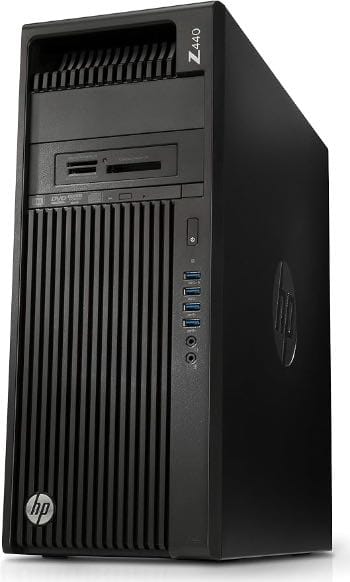
Building a VergeOS Demo Box from eBay e-Waste
There's a persistent myth that to really try enterprise hyperconverged infrastructure you need enterprise hardware — a rack, a SAN, two beefy servers, a five-figure quote. So people never get hands-on, and the software stays abstract.
I wanted to kill that myth with a single machine on my desk. The goal: a box that runs VergeOS properly — real compute, real vSAN flash, real 10GbE — capable enough to actually demo the platform, not just limp through an install. The constraint: build it entirely from eBay e-waste, the stuff data centers and offices retire by the pallet.
The result is 14 cores, 128 GB of ECC RAM, 2 TB of enterprise NVMe, and dual-port 10GbE — for under $1,000. This is a replicable build guide: every part, every price, every gotcha. Copy the list and build your own.
The full parts list
Everything here came off eBay. Prices are what I paid; listings rotate constantly, so I've included the model/part numbers — search by those if a link has expired.
| Component | Part | Price |
|---|---|---|
| Chassis | HP Z440 barebone workstation, with 700W PSU (tested, no CPU/RAM/drive) | $99.99 |
| CPU | Intel Xeon E5-2680 v4 (14C/28T, LGA2011-3, SR2N7) | $15.00 |
| Memory | 128 GB (4×32 GB) ECC DDR4-2400 RDIMM | $399.96 |
| Boot + vSAN | Intel DC P4600 2.0 TB NVMe, PCIe add-in card (SSDPEDKE020T7) | $399.88 |
| Display GPU | NVIDIA Quadro P620 2 GB (HP L85877-001) | $34.99 |
| 10GbE NIC | Intel X540-T2 dual-port 10GBASE-T (Dell 3DFV8) | $29.99 |
| Total | $979.81 |
A thousand bucks for that spec sheet still makes me grin — and here's the kicker: I bought this during a period of badly inflated memory and flash prices. The two big line items, the RAM and the NVMe, are both sitting near the top of their pricing cycle right now. In a normal market this same build lands meaningfully under a grand. So this isn't a best-case, cherry-picked total — it's the deal at the worst time to buy DRAM and NAND, and it's still absurd.
Here's why each part is the right call:
Part by part (and why)
HP Z440 barebone — $99.99. The Z440 is the e-waste sweet spot: a single-socket Xeon workstation with ECC support, eight DIMM slots, a pile of PCIe lanes, and — critically — it's quiet and sips power compared to a 2U screamer you can't run in a home office. Buying it barebone (no CPU/RAM/drive) is the move; you bring those yourself for far less than a "complete" listing charges.
A note on the power supply — verify it's the 700W. ⚠️ Read this before you buy a Z440. The Z440 shipped with either a 525W or a 700W PSU. Mine came with the 700W already, so it wasn't a separate purchase — but check before you buy, because the two aren't interchangeable for expansion: the 525W unit doesn't include the PCIe power cables for a graphics card. Even though this build doesn't use GPU acceleration, the 700W (HP 719795-003 / 809053-001) gives you the headroom — and the cabling — to add one later. If the listing doesn't state the wattage, ask.
Xeon E5-2680 v4 — $15. Yes, fifteen dollars. Fourteen cores, twenty-eight threads, Broadwell-EP, and — the part that matters for virtualization — full VT-x and VT-d, so nested clusters and device passthrough are both on the table. This is the single most absurd value in the whole build: a CPU that was a multi-thousand-dollar server part now costs less than lunch.
128 GB ECC DDR4-2400 — $399.96. Here's the honest truth of any e-waste build: RAM is the one thing that still holds its value — and right now it holds it more than usual, because memory prices are inflated across the board. The chassis (with its PSU) and the CPU together were ~$115; memory was more than three times that. But it's worth it — 128 GB is the Z440's rated maximum with registered DIMMs, it runs at the E5-2680 v4's native 2400 MT/s (no downclocking), and on a virtualization host, RAM is what caps how many VMs you can stack. This is the part to spend on — and the part that'll be even cheaper when the DRAM market cools off.
Intel DC P4600 2.0 TB — $399.88. This is the heart of the box, and it's not a consumer drive — it's enterprise NVMe rated around 3 drive-writes-per-day, which is precisely the class VergeOS calls for as its vSAN flash. And like the RAM, this price is high by historical standards — flash is riding the same inflated wave right now, so $400 for 2 TB of datacenter-grade NVMe is the expensive-era price, not the bargain-bin one. One nice surprise: the SSDPEDKE020T7 model code is the PCIe add-in-card form factor (the "D" = add-in card, vs "2" for U.2), so it drops straight into a PCIe x4 slot — no U.2 adapter needed. On this single-node box it does double duty: VergeOS boots from it and it serves as the vSAN tier.
Quadro P620 — $34.99. 💡 You need a GPU even though you don't need a GPU. Xeon E5 chips have no integrated graphics, so a Z440 with one of these installed has no video output at all until you add a card. You can't even see the installer. A cheap, single-slot, low-power Quadro P620 solves it for $35 — it's a display adapter, not an accelerator, which is exactly what a headless-ish demo box wants.
Intel X540-T2 dual 10GbE — $29.99. Thirty dollars for dual-port 10GbE is the e-waste dream. The X540 is a workhorse Intel chipset with broad driver support, and it maps directly to VergeOS's recommended "1× 10GbE for the Core Fabric." Even on a single node it makes the build feel like real HCI — and it's your ready-made path to adding a second node down the road.
Does it actually meet VergeOS's requirements?
This isn't just "it powers on." Lined up against VergeOS's documented hardware guidance, the box is genuinely right-sized, not scraping by:
- CPU: x86-64 with hardware virtualization — ✅ the E5-2680 v4 has VT-x/VT-d in spades.
- RAM: 16 GB minimum, plus ~1 GB per TB of raw storage — with 128 GB against 2 TB of flash, we're at roughly 7× the floor. Tons of headroom for stacked demo VMs and nested clusters.
- vSAN flash: enterprise NVMe (~3 DWPD) — ✅ the DC P4600 is exactly that spec, not a repurposed consumer drive.
- Networking: 1× 1GbE for external + 1× 10GbE for fabric — ✅ the Z440's onboard 1GbE handles external, the X540-T2 brings the 10GbE.
In other words, this sub-$1,000 salvage pile doesn't just tolerate VergeOS — it lands comfortably inside the recommended envelope.
What it can actually do
On a box like this you can run a real VergeOS instance and demo the things that make the platform interesting: spin up VMs, carve out isolated virtual networks (each its own VXLAN), watch vSAN dedupe and compress data on that enterprise NVMe, and — because the Xeon supports nested virtualization — even stand up nested Kubernetes clusters or tenants on top. 128 GB of RAM means you're not constantly playing Tetris with VM sizing. It's not a production cluster, but as a learning-and-demo rig it punches well above its price tag.
The honest caveats
A build guide that only lists wins isn't a build guide, it's an ad. Three things to go in with eyes open:
- Single node = no storage redundancy. VergeOS's vSAN redundancy wants two or more nodes with matching disks; one box runs happily in
noredundantmode, which is perfect for a demo but is explicitly not how you'd run anything you care about. The 10GbE NIC is your on-ramp to fixing that — add a second Z440 later and you've got a real cluster. - Boot and vSAN share one drive. Using the single P4600 as both the boot device and the vSAN drive is a deliberate simplification. In a multi-node or production build you'd give the OS its own small boot device and leave the NVMe(s) dedicated to vSAN.
- NVMe-only, no slow tier. This build is a single fast flash tier — no spinning-disk capacity tier. That's the right call for a demo box (simple, fast, quiet), but if you wanted to demo tiered storage you'd add an HDD.
- 10GbE needs a 10GbE switch. The X540-T2 is 10GBASE-T over RJ45; without a 10G switch (or a direct second-node link) it'll just negotiate down to 1G. Worth knowing before you expect 10-gig numbers.
The bigger point
Here's what I keep coming back to. The software running on this sub-$1,000 stack of salvaged parts is the same VergeOS that runs in production. Not a crippled "community edition," not a simulator — the actual platform, doing actual hyperconvergence, on hardware a data center threw away.
That's the part that should make enterprise folks pause. The barrier to trying this class of infrastructure isn't money or a lab budget — it's the myth that you need something exotic to start. You don't. You need a quiet old workstation, one good enterprise NVMe, as much RAM as you can justify, and an afternoon on eBay. Build the box, install VergeOS, and the platform stops being a slide deck and starts being something you can actually break, rebuild, and learn on.
And there's a sustainability angle here that isn't a footnote. A significant share of a server's lifetime carbon footprint is locked in before it's ever switched on — the mining, the fabrication, the shipping. Keeping retired gear running for a few more years sidesteps all of that embodied cost. Reuse beats recycle; recycle beats landfill. "End of life" turned out to be a label on someone's refresh-cycle spreadsheet, not a verdict on the hardware — because the parts a data center wrote off are, right now, running a production-grade platform on my desk.
That's the whole point of a homelab. Sometimes the best demo box for enterprise software is the one you rescued from the e-waste bin.
Parts links and prices were current when I built this; eBay listings rotate constantly, so search by the model/part numbers in the table if a link has died. Build at your own risk — used enterprise gear is a gamble, but at these prices it's a fun one.